Cancellation is one of the most sensitive moments in the subscription lifecycle. It’s also one of the most overlooked.
Most Shopify subscription apps still treat it like a static survey. Same flow. Same offers. No real personalization. And very little visibility into what’s actually working.
For teams that care about long-term subscription retention and data-backed optimization, that approach creates two problems:
- You leave revenue on the table
- Your team spends too much time manually testing and guessing
That’s why we built Cancellation Flows. Cancellation Flows live inside the Stay AI merchant portal and let you design segmented, on-brand cancel experiences that are measurable, easy to iterate on, and meet subscribers where they actually are.
Brands using Cancellation Flows are already seeing 30–35% save rates, because the experience adapts to who the subscriber is and why they’re leaving.
If you own retention metrics but don’t have engineering resources to spare, this is for you.
The Problem: Cancel Experiences Are Rigid, Generic, and Hard to Improve
Most cancellation experiences today look the same. Brands are forced to
- Pay additional fees for advanced cancellation flow tools
- Show every subscriber the same survey
- Accept default layouts, copy, and UX that don’t match their brand and don’t offer personalized experiences to customers
- Dig through reporting that lives in a different dashboard – if it exists at all
For example, a first-time subscriber who has too much product shouldn’t have the same experience as a long-time VIP relocating to a different country.
On top of this, advanced cancel flows are often gated behind higher-tier plans or require engineering support. Segmentation logic, design and branding, and reporting might as well each be different dashboards (and often are!).
Without access to real-time, easy-to-understand, and extractable data, you’re left guessing at what’s working to retain subscribers. The result is often lost revenue and preventable customer churn. Beyond that, the siloed approach means losing any insights that could have informed education messaging further upstream, plan changes, or smarter save offers.
The Solution: Segmented Cancellation Flows
Cancellation Flows give Stay AI brands a native, visual builder to design smarter cancel experiences that improve subscription retention – directly inside the same merchant portal they already use.
Instead of sending every subscriber through a one-size-fits-all survey, you can build intentional paths that adapt in real time.
With Cancellation Flows, you can:
- Route subscribers by real-time segments so the experience matches their product, lifecycle stage, LTV, geography, and more
- Stack multiple save offers in a single path instead of forcing subscribers through disconnected screens and risking drop-off
- Fully control the design on every screen – copy, layout, colors, fonts, images, and video – so your cancel experience stays (and feels) on brand
- See performance at every step (coming soon) so you know exactly what’s working and where to improve
Segmentation, UX, and analytics all live in one place, which means you can build, measure, and refine without relying on engineering or switching between multiple dashboards.
Let’s explore each of these capabilities more in-depth:
Segment and route subscribers in real-time
Every subscriber shouldn’t have the same cancellation experience. Segmentation ensures each subscriber starts in the most relevant path from the very first screen.
With Cancellation Flows, you can route subscribers into different paths based on real-time data, so the experience matches who they are and why they’re leaving.
When a subscriber enters the cancel flow, Stay evaluates live attributes instead of relying on static lists. That means the right path loads immediately.
You can segment by:
- Subscription status
- Created date or tenure
- AOV
- Geography
- Product or cadence
- And more
Stack save offers in a single, intentional flow
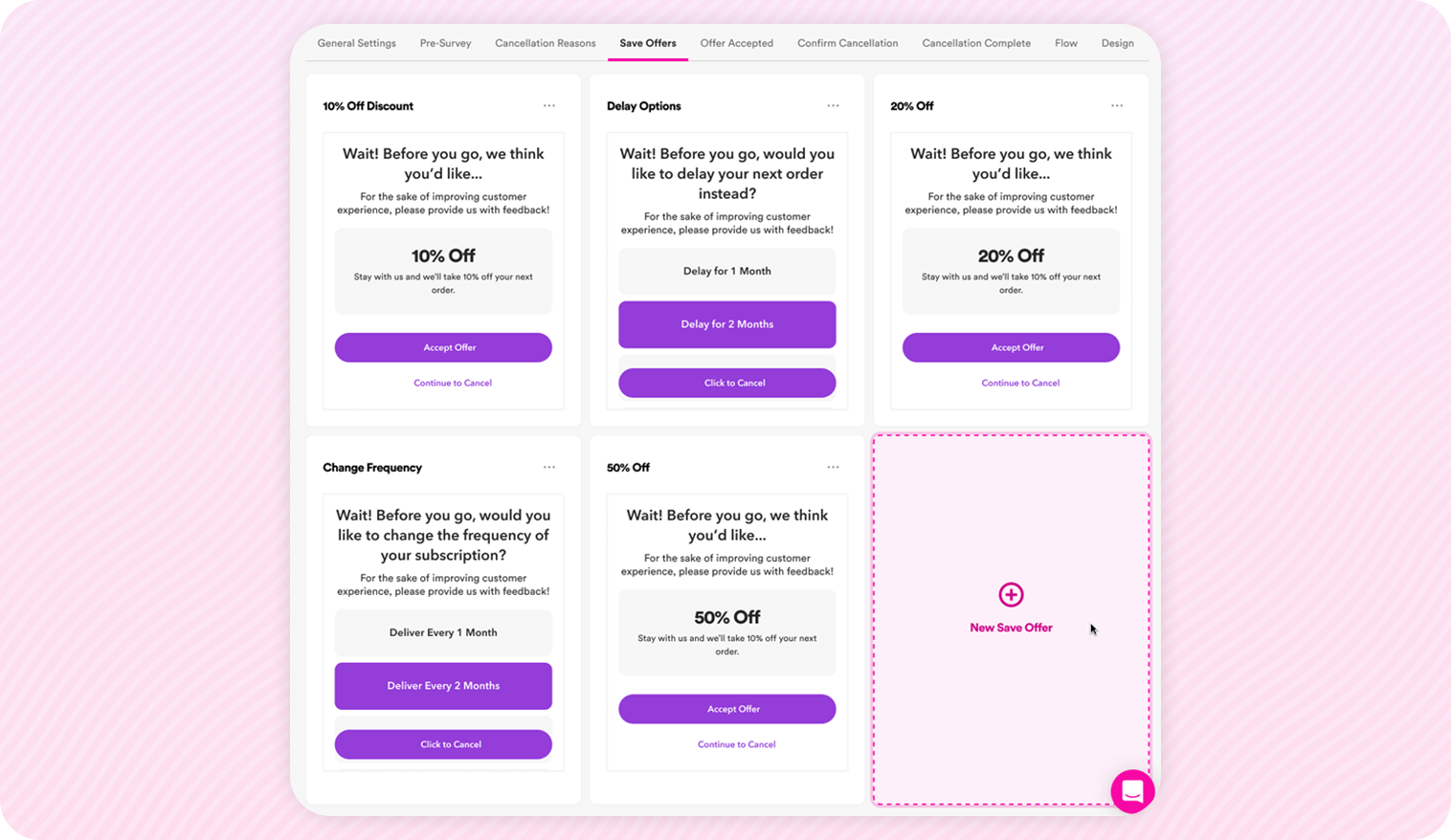
Most cancellation tools force you to choose one save offer.
Cancellation Flows let you stack them to create a thoughtful sequence that increases subscription retention and save rate.
Instead of presenting an ultimatum – “Take this discount or cancel” – you can layer offers in a way that matches subscriber intent.
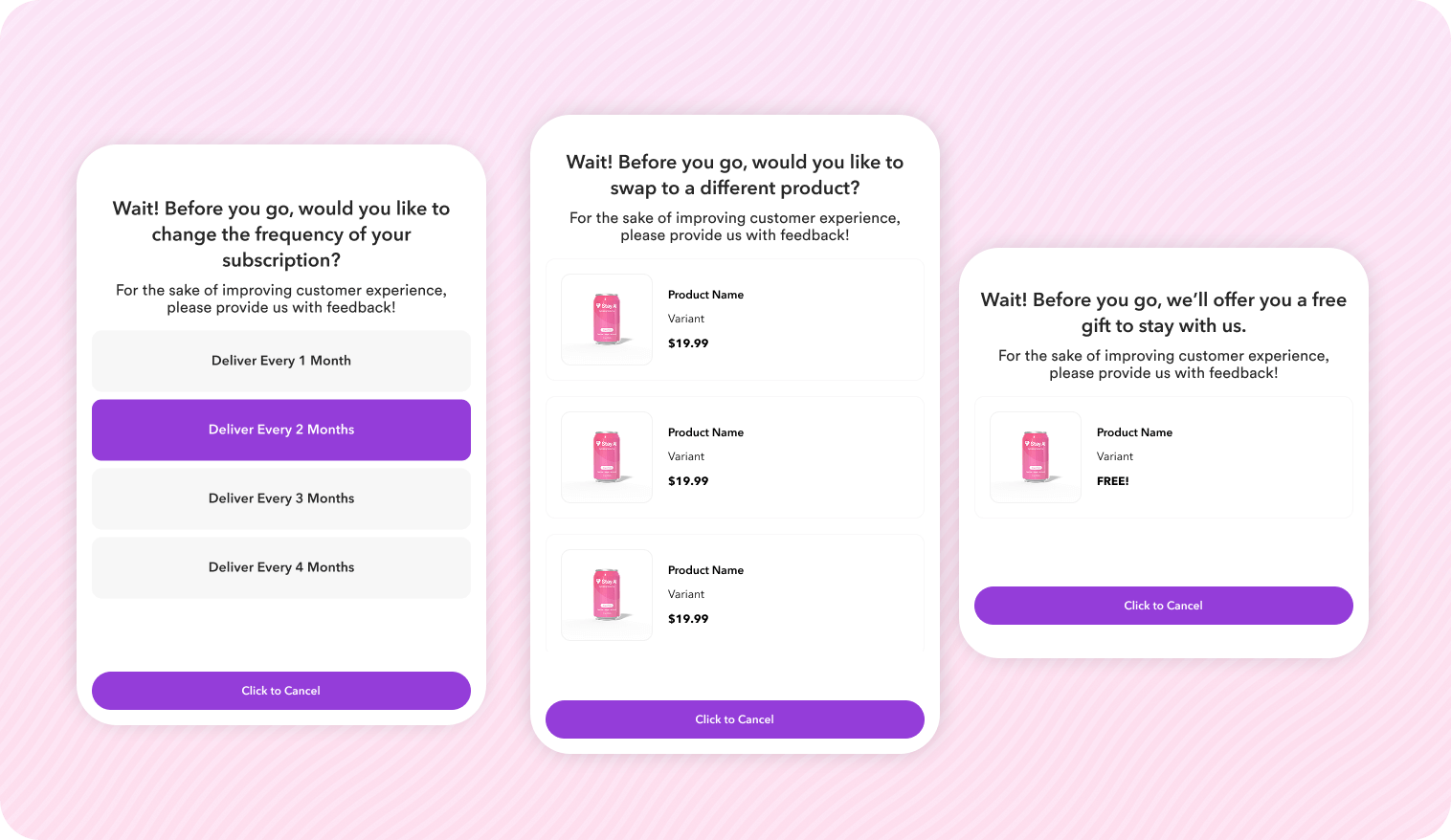
For example, if a subscriber is canceling because they have “too much product”, you can:
- Lead with an offer to delay
- If they don’t delay, then you can offer a swap
- If they don’t swap, then you can offer a discount
You can also bundle multiple actions into a single save moment, triggered with one click.
For example, you can offer a:
- Swap to a better-fit product
- Apply a light discount
- Get it now
Subscribers just need to press one CTA to get all of these offers at the same time – no need to click through multiple screens.
Because offers are saved in a shared library, you can adjust escalation and refine performance without rebuilding the entire flow.
Take full control of UX and branding
Your cancellation flow is a part of your brand.
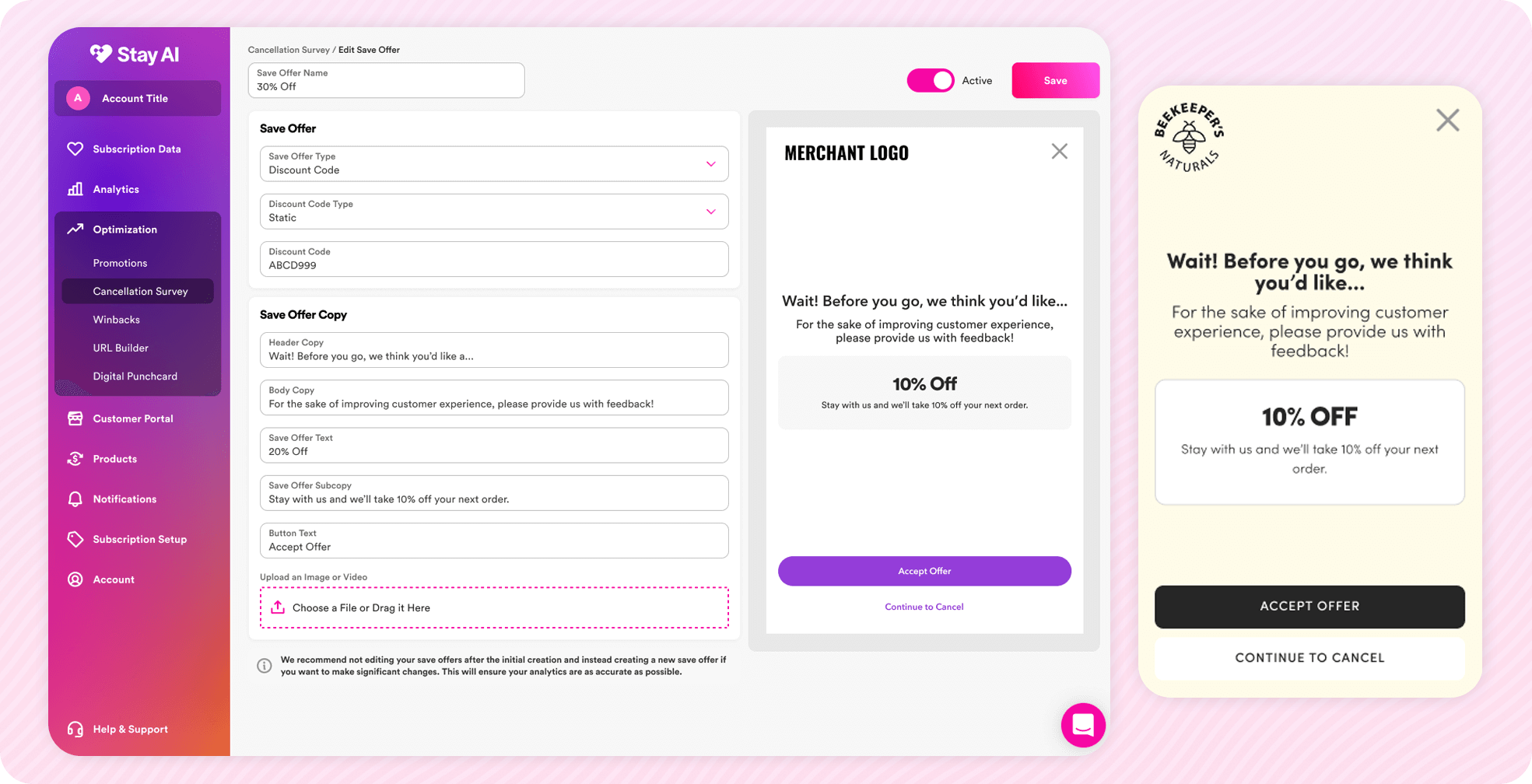
With Cancellation Flows, you control how every screen looks and feels, so the experience stays consistent, credible, and on-brand.
You can customize:
- Copy and messaging
- Layout and button copy
- Colors and fonts
- Images and video on each screen
- Confirmation and rescue screens
Since everything is built natively inside Stay AI, your cancel experience never feels like a third-party tool layered on top of your store.
For global brands, the flow also works with translation plugins, so subscribers see a localized experience without extra work.
Coming soon: track and improve performance right where you build
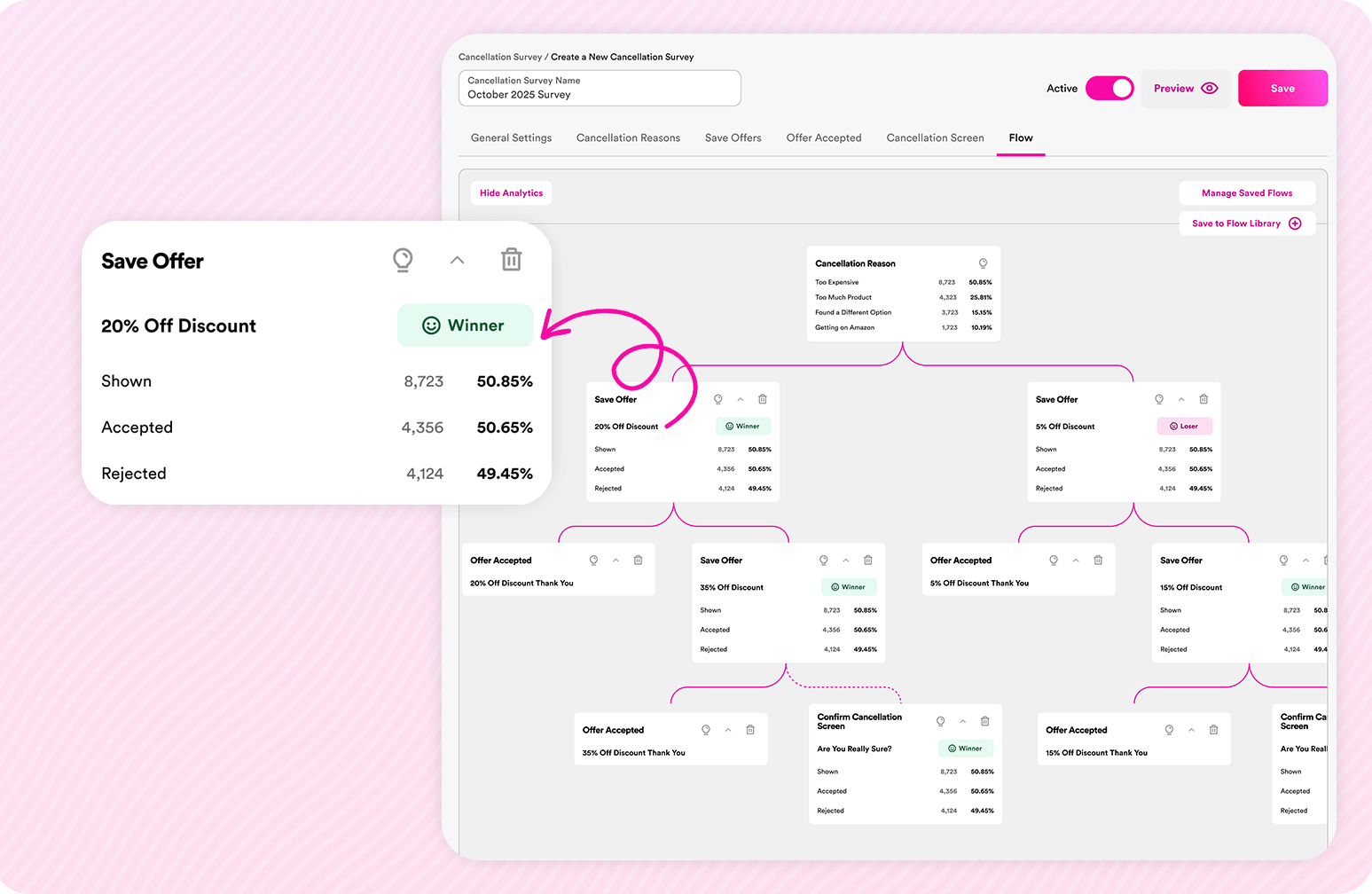
Traditional cancel tools in most Shopify subscription management platforms separate building from reporting.
You create the flow in one place.
You check performance somewhere else.
So connecting the distance between question (“how did my cancel survey perform?”) and action (“here’s how I’ll optimize”) takes more time.
But, with Cancellation Flows, you’ll be able to see, for each save step:
- How many subscribers saw the screen
- How many accepted the offer
- How many skipped
All visible in the same canvas where you edit the flow!
With a comprehensive view of customer segments, design, and analytics living together, you can:
- Remove underperforming steps
- Tine escalation
- Refine messaging
- Improve save rate over time
Instead of guessing what’s working, you’ll know. Look out for this feature coming soon.
Cancellation Isn’t Just a Subscription Retention Metric
By the time a subscriber enters your cancel flow, the decision is already forming. The question is whether your experience responds intelligently or treats every subscriber the same.
When you repeatedly see reasons like:
- “I’m not feeling the effects”
- “I have too much product”
- “It’s not worth it”
That’s not just churn data. It’s operational insight.
It tells you where onboarding needs strengthening.
Where cadence needs adjusting.
Where save logic should change.
Cancellation Flows connect those pieces. You can:
- Segment subscribers in real time
- See what’s working at every step
- Refine and optimize without engineering help
When cancellation becomes measurable and structured, you can start preventing churn before it happens.
If you’re tired of guessing what’s working – and want a cancel experience that actually improves over time – Cancellation Flows are built to do exactly that.
Get a demo to see what the future of retention marketing looks like.
FAQs
No. Stay’s proprietary machine learning model never invents new offers on its own. The AI in RetentionEngine only evaluates and selects from the treatments you’ve explicitly configured, applying strict eligibility, gaming-prevention, and contextual rules before anything is shown.
Yes. Preview mode is the standard view of Cancellation Flows. There is no separate tab you need to enter for previewing, as it is the default view that lets you walk the save flow and choose conditions to see the path a subscriber would take. You see what your customers will see at every step.
Your new survey starts fresh – you can still view legacy save rate separately. To view your save rate, head to Analytics in the menu bar, select Churn, then click RetentionEngine Reporting.
Yes. Cancellation Flows are native (no iframe), removing prior blockers to localization and translation.